Most free plugins are one of two things: a demo with a timer, or a stripped-down build made deliberately worse so you’ll pay for the real one.
RSL One is neither. It runs the same Warm and Tube saturation circuit as our Dual Core Saturator, on a single core instead of two. Nothing is time-limited, and there’s no license key to activate. It’s free, it stays free, and it now runs on Windows as well as macOS.
What to look for in a free saturation plugin
“Free” covers a lot of ground. Before you install anything, here’s what separates a free saturator you’ll keep using from one you’ll delete within a week.
- The real processing, not a demo. No timer, no feature that switches off, no build made worse on purpose. If the free version sounds compromised, you’ll never trust it on a mix.
- Gain compensation. Saturation adds level, and louder always sounds better at first. Without automatic gain matching you’re judging volume, not tone.
- Visible input level. Saturation depends on level. If you can’t see what’s hitting the circuit, you can’t repeat a result.
- A wet level control. Parallel blending is how saturation adds weight without smearing transients. A saturator without it is much harder to use on buses.
- A small, focused control set. Most saturation damage comes from too many interacting parameters and no reliable way to compare.
- Formats that match your setup. Check your operating system, your host’s plugin format and your processor before you download.
RSL One was built to tick all of these boxes.
Why RSL One is not a crippled demo
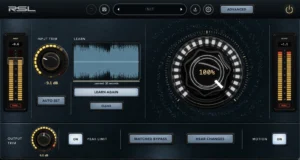
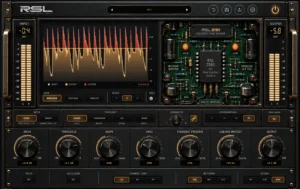
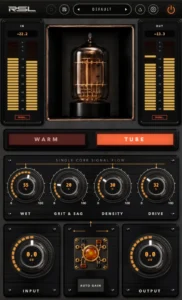
RSL One is a single-core saturation processor with two voicings, Warm and Tube, and four controls: wet level, Depth, Density and Drive. It also has Auto Gain, and metered input and output staging.
That control set is deliberately small. Fewer controls plus honest metering gets you to a good result faster than a large panel does.
The circuit is the point. This isn’t a simplified approximation of the paid plugin. It’s the same Warm and Tube behavior, running once instead of twice. The only real difference is the number of cores, and we explain exactly what that means further down.
Getting it installed
Download it from the freebies page. You’ll need a free account, which also gives you somewhere to re-download from later instead of hunting for the installer when you change machines. No license key is issued because none is needed.
macOS
macOS 11 or newer, as a Universal 2 build that runs natively on both Intel and Apple Silicon. You get Audio Unit, VST3, AAX and a Standalone application.
Formats install to the standard macOS locations: Audio Units in /Library/Audio/Plug-Ins/Components, VST3 in /Library/Audio/Plug-Ins/VST3, AAX in /Library/Application Support/Avid/Audio/Plug-Ins.
Windows
Windows 10 64-bit or newer. You get VST3 and a Standalone application, so any VST3 host can load it.
Pro Tools
On macOS the installer includes AAX, so Pro Tools loads RSL One. There’s no AAX on Windows yet, so Pro Tools on Windows won’t load it.
If the plugin doesn’t show up right away, most hosts need a restart or a manual plugin rescan.
How to use each control
Drive
Tube intensity: how hard the signal is pushed into the circuit. Treat it as a character control rather than an amount control.
The circuit responds to what you feed it, so a signal at −18 dBFS and the same signal at −6 dBFS are meeting a meaningfully different processor, not just more of the same one. In practice, your input level is a creative decision.
Depth
Grit and sag. This is where the behavior lives that a static distortion curve can’t produce: the sense of a supply rail giving way slightly under load and recovering.
Small amounts add a feeling of movement and effort. Large amounts become an obvious effect, which is sometimes exactly right on a source that needs to sound damaged. Depth is the control most worth exploring slowly.
Density
How tightly packed the harmonic content becomes. Drive decides how hard you hit the circuit, and Density shapes the result.
More gives a fuller, more consolidated sound. Less leaves more space between elements.
Wet level
The blend between dry and saturated signal, and the most underrated control in the plugin. Parallel processing lets you keep the original transients intact while adding harmonic weight underneath.
A quick way to find a setting: push the other controls with wet level at 100 percent, then blend back. You’ll end up somewhere better than if you crept up from zero.
Auto Gain
Leave this on while you’re making decisions. Saturation adds level, and louder reliably sounds better to human ears for the first few seconds. Auto Gain removes the level difference so you compare character, not volume.
Input and output metering
Drive responds to level, so the input meter is how you know which version of the circuit you’re hearing. Use the metered input and output staging to set a consistent level into the plugin and to hand a sensible level to whatever comes next.
Warm or Tube: choosing a voicing
Reach for Warm when a source needs body and cohesion without an obvious change in character. The goal is that it sounds like itself, only more present and more finished.
Reach for Tube when you want to hear the harmonic signature. It brings the bloom you get from pushing a valve stage, with more forward midrange presence.
Five places it earns its keep
These are starting points. Adjust by ear from there.
- Lead vocals: Tube, moderate Drive, wet level around three quarters. This adds presence without an EQ boost, which matters because harmonic content survives small speakers better than a high shelf does.
- Bass: Tube, and be more generous than feels comfortable. Upper harmonics let a listener’s ear reconstruct a fundamental that their laptop or phone can’t physically reproduce. A bass that vanishes on small speakers usually needs harmonics, not more low end.
- Drum bus: Warm, lower Drive, wet level around half. Parallel blending is the key here: you want the transients intact and the weight added underneath, not smeared attacks.
- Electric guitars: Either voicing, depending on the part. Density matters most here, because it helps layered guitars sit in one space instead of several competing ones.
- Mix bus: Warm, low Drive, low wet level, Auto Gain on. Use considerably less than you think. The goal is cohesion, and if you can clearly hear it working, it’s probably too much.
How not to overdo it
Saturation flatters immediately and fatigues slowly. That combination is what makes it the most commonly overapplied process in mixing.
- Keep Auto Gain on for every comparison.
- Set the plugin, then bypass it for thirty seconds and come back.
- Check on a small speaker or phone, because harmonic density that sounds rich on monitors can sound brittle on the systems most people actually use.
If a setting still sounds right the next morning, it was right.
RSL One vs RSL Dual Core Saturator
The limit of a single core
Any single-core saturator, ours included, has the same limit: the whole signal meets the circuit at once. Low frequencies carry most of the energy, so they dominate the harmonic output.
On a bass-heavy drum bus or a full mix, the kick smears before the top end has taken on any color. Parallel blending and conservative Drive get you a long way around this, but eventually you’ll want the bands treated separately. That’s what a multiband saturation plugin is for.
What the Dual Core Saturator adds
- RSL One (free): one core, two characters (Warm and Tube), wet level, Depth, Density, Drive, Auto Gain and metered input and output staging. macOS and Windows.
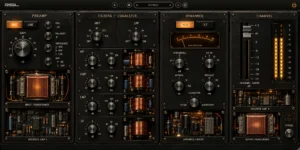
- RSL Dual Core Saturator: multiband saturation from a second core, with the signal split at a crossover so each band is driven separately, and seven characters: Warm, Tube, Clip, Tape, Ferro, Ionic and VO2.
The Dual Core Saturator is $69 at the founders’ price until 30 November 2026, then $99. There’s also a free 14-day trial of the full plugin, and no card is needed.
But there’s no rush and no pressure. RSL One isn’t a countdown to a purchase. Use it for as long as it does the job.
Key takeaways
- RSL One is a free saturation plugin with no license key and no time limit: the same Warm and Tube circuit as the Dual Core Saturator, on one core.
- macOS 11 or newer (Universal 2 for Intel and Apple Silicon) in AU, VST3 and Standalone. Windows 10 64-bit or newer in VST3 and Standalone. No AAX, so no Pro Tools.
- Drive is a character control: your input level changes which processor you’re hearing.
- Push the settings with wet level at 100 percent, then blend back.
- Leave Auto Gain on for every comparison, or louder will keep winning.
- With a single core, low frequencies dominate the harmonic output. When that becomes the limitation, band-split processing is the answer.
Download RSL One from the freebies page, compare both plugins on the plugins page, read about using dual-core saturation on buses, stems and masters, or find out why we model circuit behavior rather than specific machines.